> ## Documentation Index
> Fetch the complete documentation index at: https://docs.lobbystack.com/llms.txt
> Use this file to discover all available pages before exploring further.
# Analytics
> Review engagement trends across calls, messages, appointments, call outcomes, and communication channels.
The **Analytics** page helps you understand how customers are using your receptionist. It summarizes weekly activity and shows whether calls, messages, appointments, and average call duration are moving up or down.
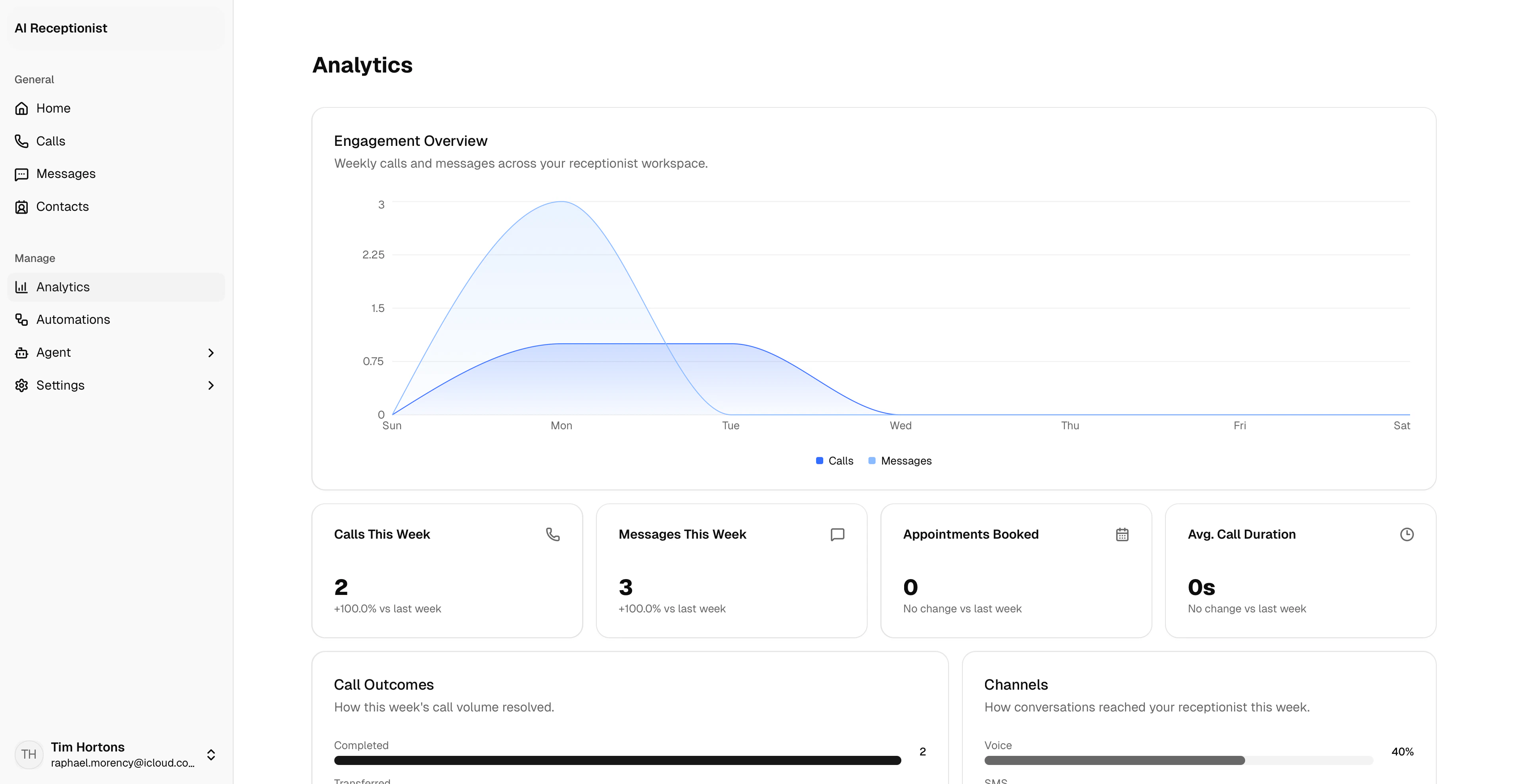 *Analytics helps you spot workload changes and decide where to tune your agent or follow-up process.*
## What Analytics shows
| Section | What it is for |
| ------------------------- | ----------------------------------------------------------------- |
| **Engagement overview** | Weekly calls and messages in one chart. |
| **Calls this week** | Call count and change compared with the previous week. |
| **Messages this week** | SMS conversation activity and weekly change. |
| **Appointments booked** | Booking volume and weekly change. |
| **Average call duration** | Typical call length and week-over-week change. |
| **Call outcomes** | Completed, transferred, live, and missed call outcomes. |
| **Channels** | The share of activity coming from voice, SMS, and other channels. |
## Review performance
In the dashboard sidebar, go to **Manage** > **Analytics**.
Look at the metric cards to see whether call, message, appointment, and duration trends changed from the previous week.
Use **Call outcomes** to see whether calls are completing, transferring, or being missed.
Use **Channels** to understand how much activity is coming through voice, SMS, and other sources.
## How to read the trends
| Signal | What to check |
| -------------------------------------- | --------------------------------------------------------------------------------------------------------------------------------- |
| **Calls are rising** | Review whether the team needs more coverage for follow-ups, transfers, or booking requests. |
| **Messages are rising** | Check active conversations and decide whether more threads should stay automated or be handled by staff. |
| **Appointments are rising** | Review upcoming appointments and make sure services and calendar settings still match your capacity. |
| **Missed or failed outcomes increase** | Open recent calls, review transcripts, and adjust knowledge, rules, or transfer settings if callers are getting stuck. |
| **Average duration changes sharply** | Longer calls can mean callers need more explanation; shorter calls can mean answers are easier to find or calls are ending early. |
## Weekly review routine
1. Start with the metric cards to see what changed.
2. Review **Call outcomes** for missed, failed, or transfer-heavy patterns.
3. Open **Calls** for examples behind the trend.
4. Update **Knowledge** or **Rules** when callers are repeatedly asking about the same topic.
5. Recheck Analytics after the next busy period to see whether the change helped.
## When to use it
Use Analytics when you want to understand workload, spot changes in caller behavior, or decide whether your agent setup needs adjustment. For individual conversations, use **Calls**, **Messages**, and **Contacts**.
*Analytics helps you spot workload changes and decide where to tune your agent or follow-up process.*
## What Analytics shows
| Section | What it is for |
| ------------------------- | ----------------------------------------------------------------- |
| **Engagement overview** | Weekly calls and messages in one chart. |
| **Calls this week** | Call count and change compared with the previous week. |
| **Messages this week** | SMS conversation activity and weekly change. |
| **Appointments booked** | Booking volume and weekly change. |
| **Average call duration** | Typical call length and week-over-week change. |
| **Call outcomes** | Completed, transferred, live, and missed call outcomes. |
| **Channels** | The share of activity coming from voice, SMS, and other channels. |
## Review performance
In the dashboard sidebar, go to **Manage** > **Analytics**.
Look at the metric cards to see whether call, message, appointment, and duration trends changed from the previous week.
Use **Call outcomes** to see whether calls are completing, transferring, or being missed.
Use **Channels** to understand how much activity is coming through voice, SMS, and other sources.
## How to read the trends
| Signal | What to check |
| -------------------------------------- | --------------------------------------------------------------------------------------------------------------------------------- |
| **Calls are rising** | Review whether the team needs more coverage for follow-ups, transfers, or booking requests. |
| **Messages are rising** | Check active conversations and decide whether more threads should stay automated or be handled by staff. |
| **Appointments are rising** | Review upcoming appointments and make sure services and calendar settings still match your capacity. |
| **Missed or failed outcomes increase** | Open recent calls, review transcripts, and adjust knowledge, rules, or transfer settings if callers are getting stuck. |
| **Average duration changes sharply** | Longer calls can mean callers need more explanation; shorter calls can mean answers are easier to find or calls are ending early. |
## Weekly review routine
1. Start with the metric cards to see what changed.
2. Review **Call outcomes** for missed, failed, or transfer-heavy patterns.
3. Open **Calls** for examples behind the trend.
4. Update **Knowledge** or **Rules** when callers are repeatedly asking about the same topic.
5. Recheck Analytics after the next busy period to see whether the change helped.
## When to use it
Use Analytics when you want to understand workload, spot changes in caller behavior, or decide whether your agent setup needs adjustment. For individual conversations, use **Calls**, **Messages**, and **Contacts**.