> ## Documentation Index
> Fetch the complete documentation index at: https://docs.lobbystack.com/llms.txt
> Use this file to discover all available pages before exploring further.
# Review calls
> Use the Calls page to review inbound calls, outcomes, transcripts, recordings, and follow-up tasks.
The **Calls** page is the call history for your active business. It shows inbound calls handled by LobbyStack, including status, outcome, transcript availability, and recording availability.
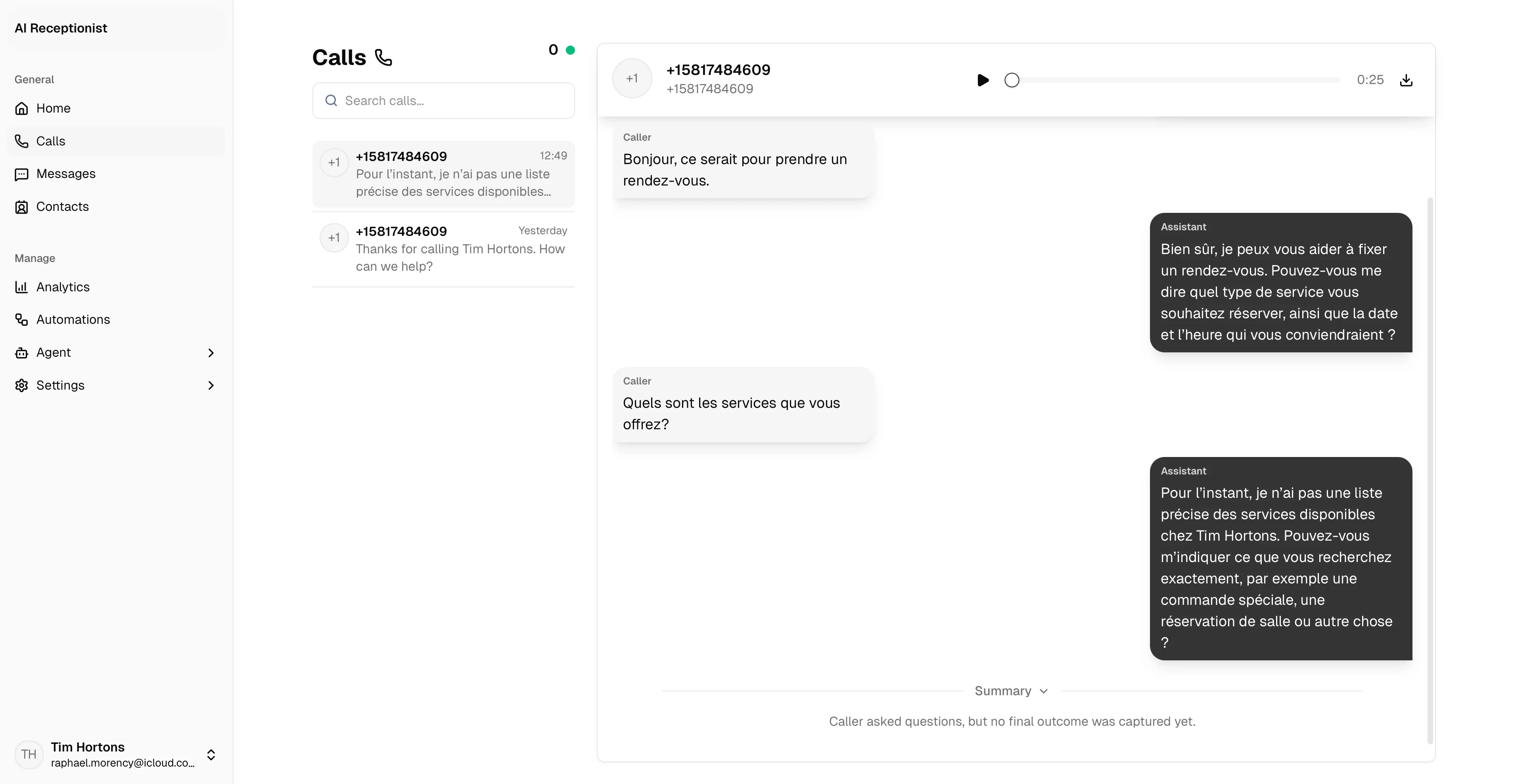 *The Calls page lets operators review the call list, open details, and follow up from one place.*
## What the call list shows
Each row can include:
* Caller name or unknown caller label.
* Caller phone number.
* Purpose or outcome summary.
* Start time.
* Status and disposition.
* Transcript indicator.
* Audio playback when a recording is available.
The page header also shows how many calls are currently live.
## Search and filter
Use the search field to find calls by caller name, phone number, or outcome text. Use the status filter to narrow the list.
## Call detail view
Open a call to see three tabs:
| Tab | What it shows |
| -------------- | ----------------------------------------------------------------------------------------------------- |
| **Transcript** | Saved caller and assistant turns when available. |
| **Recording** | Audio player after call audio is uploaded, or a processing state while audio is still being prepared. |
| **Details** | Outcome, follow-up task, call status, transfer status, and timing details. |
## Follow-up tasks
If the receptionist takes a callback or follow-up message during a call, the task appears on the call detail page. Operators can mark the task done from the dashboard.
## Recordings
LobbyStack stores a recording when call audio is available. While audio is still being prepared, the dashboard shows a processing state.
Recording playback appears after the call audio finishes processing. Use your workspace and compliance settings to manage recording and retention policy.
## Outcomes
Call summaries can include outcomes such as:
* Appointment booked.
* Scheduling started but not completed.
* Message taken.
* Transfer completed, busy, or failed.
* Completed without a structured outcome.
* Failed, canceled, no-answer, or technical issue.
*The Calls page lets operators review the call list, open details, and follow up from one place.*
## What the call list shows
Each row can include:
* Caller name or unknown caller label.
* Caller phone number.
* Purpose or outcome summary.
* Start time.
* Status and disposition.
* Transcript indicator.
* Audio playback when a recording is available.
The page header also shows how many calls are currently live.
## Search and filter
Use the search field to find calls by caller name, phone number, or outcome text. Use the status filter to narrow the list.
## Call detail view
Open a call to see three tabs:
| Tab | What it shows |
| -------------- | ----------------------------------------------------------------------------------------------------- |
| **Transcript** | Saved caller and assistant turns when available. |
| **Recording** | Audio player after call audio is uploaded, or a processing state while audio is still being prepared. |
| **Details** | Outcome, follow-up task, call status, transfer status, and timing details. |
## Follow-up tasks
If the receptionist takes a callback or follow-up message during a call, the task appears on the call detail page. Operators can mark the task done from the dashboard.
## Recordings
LobbyStack stores a recording when call audio is available. While audio is still being prepared, the dashboard shows a processing state.
Recording playback appears after the call audio finishes processing. Use your workspace and compliance settings to manage recording and retention policy.
## Outcomes
Call summaries can include outcomes such as:
* Appointment booked.
* Scheduling started but not completed.
* Message taken.
* Transfer completed, busy, or failed.
* Completed without a structured outcome.
* Failed, canceled, no-answer, or technical issue.