> ## Documentation Index
> Fetch the complete documentation index at: https://docs.lobbystack.com/llms.txt
> Use this file to discover all available pages before exploring further.
# Manage messages
> Review SMS conversations, send manual replies, attach files, and pause or resume AI automation for a thread.
The **Messages** page shows SMS conversations for the active business. It is where operators review inbound and outbound messages, reply manually, inspect attachments, and control AI handoff per conversation.
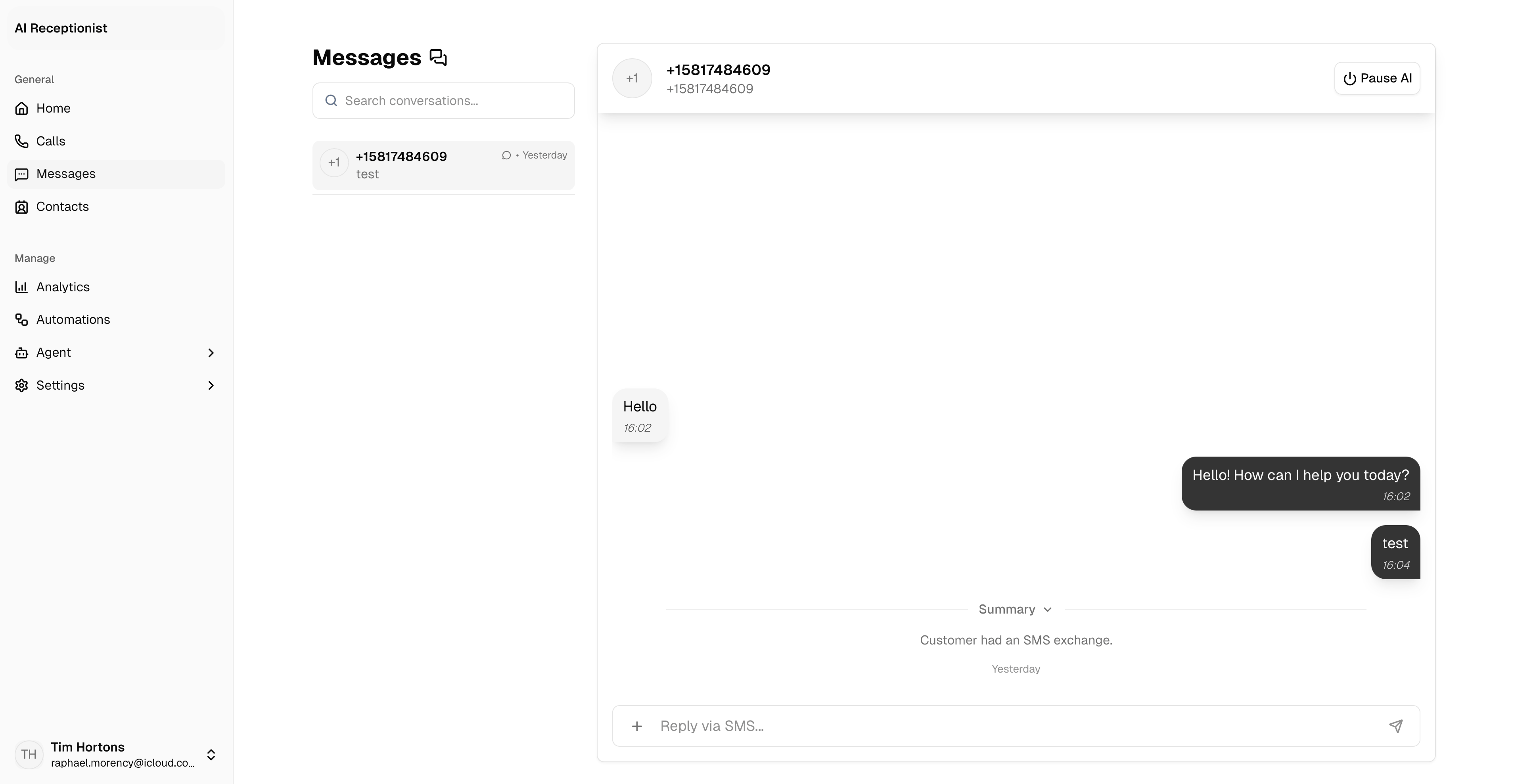 *Use Messages for active SMS conversations, manual replies, attachments, and AI handoff control.*
## Conversation list
The left panel shows conversations sorted by recent activity. Each item can show:
* Contact name or unknown contact.
* Last message preview.
* Attachment preview labels such as photo or document.
* Timestamp.
* Blocked status when the contact is blocked.
Use search to find conversations by contact or message content.
## Conversation thread
Open a conversation to see the message timeline. The thread can include:
* Inbound customer messages.
* Outbound AI or operator messages.
* Attachments.
* Delivery failure states.
* Session summaries.
## Send a manual reply
Select an SMS conversation from the list.
Use the composer at the bottom of the thread.
Add up to 3 attachments. Images and documents are supported.
Click **Send**.
If a contact is blocked, the composer is disabled until the contact is unblocked from Contacts.
## Pause or resume AI
The thread header lets operators pause AI replies for that conversation. A human reply also places the conversation into handoff mode. Resume AI when the conversation should return to automated handling.
## Attachments
Messages can include photos and documents. Image attachments may render as previews. Other files appear as attachment cards or links depending on delivery mode.
*Use Messages for active SMS conversations, manual replies, attachments, and AI handoff control.*
## Conversation list
The left panel shows conversations sorted by recent activity. Each item can show:
* Contact name or unknown contact.
* Last message preview.
* Attachment preview labels such as photo or document.
* Timestamp.
* Blocked status when the contact is blocked.
Use search to find conversations by contact or message content.
## Conversation thread
Open a conversation to see the message timeline. The thread can include:
* Inbound customer messages.
* Outbound AI or operator messages.
* Attachments.
* Delivery failure states.
* Session summaries.
## Send a manual reply
Select an SMS conversation from the list.
Use the composer at the bottom of the thread.
Add up to 3 attachments. Images and documents are supported.
Click **Send**.
If a contact is blocked, the composer is disabled until the contact is unblocked from Contacts.
## Pause or resume AI
The thread header lets operators pause AI replies for that conversation. A human reply also places the conversation into handoff mode. Resume AI when the conversation should return to automated handling.
## Attachments
Messages can include photos and documents. Image attachments may render as previews. Other files appear as attachment cards or links depending on delivery mode.